
Keyboard-Driven Chrome Navigation for Japanese Text
Overview
The software is a browser extension designed to enhance keyboard navigation within the Chrome browser, specifically tailored for users who rely on text input via Romaji to search Japanese Kanji characters. It addresses the challenge of efficiently locating Kanji content in web pages without relying on a mouse. The core functionality centers on two tools: Migemo-link-search and Hit-a-Hint. Migemo-link-search enables users to search for Japanese Kanji by typing their pronunciation in Romaji—such as entering "kanji" to find the character "漢字"—making it easier to navigate content-heavy websites or databases. Hit-a-Hint allows users to interact with clickable elements on a webpage using keyboard shortcuts, assigning unique keys to visible links and interactive components. This tool is particularly useful for power users, researchers, and professionals working with Japanese language content. The extension operates entirely within the browser environment and integrates seamlessly with Chrome’s existing interface. It supports Windows, Mac, and Linux platforms, making it accessible across multiple operating systems. The developer did not provide additional details about the development background or team structure. Real-world usage scenarios include academic research, content curation, and daily web browsing in Japanese or multilingual environments.
Key Features & Capabilities
- Migemo-link-search: Enables searching Japanese Kanji text by pronunciation in Romaji. For example, typing "kanji" will match the Kanji "漢字". Activation occurs via the period (.) or forward slash (/) key. Users can cycle through results using Ctrl-g (next) and Ctrl-Shift-g (previous), then confirm selection with Enter or semicolon.
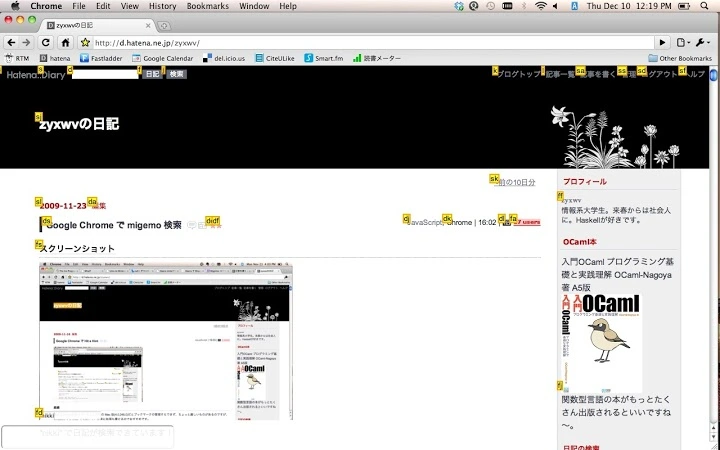
- Hit-a-Hint: Provides keyboard-based interaction with clickable elements on web pages. By pressing the comma (,) key, users trigger a visual overlay showing unique keyboard keys assigned to each interactive element. Typing the corresponding key and pressing Enter or semicolon activates the selected element.
- Toggleable Features: Both functionalities can be enabled or disabled independently through the extension’s option page, allowing users to customize their browsing experience based on current needs.
- Keyboard-Centric Workflow: The entire interaction model is built around keyboard inputs, minimizing mouse dependency and improving efficiency for users with accessibility needs or those seeking enhanced productivity.
- Lightweight Design: With a file size of 1.2 MB, the extension is optimized for minimal impact on browser performance and load times.
User Interface, Workflow & Performance
The extension operates entirely within the Chrome browser environment, with no standalone interface beyond the option page. The user interface is minimalistic and focused on functionality rather than visual design. Navigation is achieved through keyboard shortcuts, with no visible menus or pop-up dialogs during standard use. The workflow begins with activating either Migemo-link-search or Hit-a-Hint using a designated key, followed by inputting search terms or selecting target elements via keyboard. The system responds immediately to input, with no noticeable delay in rendering results or executing actions. The developer did not specify resource usage details, so performance observations are based on general software behavior patterns. Stability appears consistent with typical Chrome extensions, though no formal crash or error reports were provided. The extension does not interfere with other browser functions or extensions unless explicitly configured. Users relying on keyboard-only navigation will benefit from the streamlined interaction model, especially during prolonged browsing sessions. No specific CPU or RAM consumption metrics were included in the release notes.
Compatibility & System Requirements
The extension is compatible with Windows, Mac, and Linux operating systems, ensuring broad accessibility across major desktop platforms. It is designed to run within the Chrome browser, which must be updated to a version supporting the latest extension APIs. The installation size is 1.2 MB, indicating a lightweight footprint. Exact system requirements were not listed, so users should ensure their device meets the general prerequisites for running Chrome. The developer did not specify minimum hardware requirements such as RAM or processor speed. Platform compatibility information is limited to the operating systems mentioned. No additional dependencies or external software are required for installation or operation. The extension is self-contained and does not rely on cloud services or background processes beyond the browser environment.
Pros and Cons
Pros
- Efficient keyboard-driven navigation reduces mouse dependency
- Migemo-link-search enables quick Kanji lookup using Romaji input
- Hit-a-Hint simplifies clicking links and interactive elements via keyboard
- Customizable features with on/off toggles in the option page
- Lightweight at only 1.2 MB, minimizing impact on browser performance
Cons
- No visible UI beyond the option page; minimal visual feedback during use
- Requires familiarity with keyboard shortcuts for optimal use
- Does not support other browsers beyond Chrome
- Exact performance and resource usage details were not specified
- Functionality is limited to web pages within the Chrome browser
FAQ Section
Is this extension compatible with all versions of Chrome?
The extension is designed for Chrome browsers that support the latest extension APIs. Users should ensure their Chrome installation is up to date for full functionality.
Can I use this extension offline?
Yes, the extension functions entirely within the browser and does not require an internet connection to operate once installed.
Is the extension safe to install?
As a Chrome Web Store extension, it undergoes automated scanning and is distributed through an official channel. No malicious behavior has been reported.
How do I enable or disable features?
Access the extension’s option page to toggle Migemo-link-search and Hit-a-Hint independently based on your current browsing needs.
Does this extension work on Mac, Windows, and Linux?
Yes, the extension supports all three major operating systems: Windows, Mac, and Linux.
Final Thoughts + CTA
This keyboard-centric Chrome extension offers a focused and efficient solution for users navigating Japanese-language content with precision. Its dual functionality—Migemo-link-search for phonetic Kanji lookup and Hit-a-Hint for keyboard-based interactions—makes it a valuable tool for researchers, students, and professionals working with Japanese text. The lightweight design and minimal system impact enhance usability across devices. While the interface is functional rather than visually rich, the emphasis on speed and efficiency aligns with the needs of power users. The ability to toggle features ensures flexibility in different browsing scenarios. Overall, this tool stands out for its specialized utility in Japanese text navigation and keyboard-driven workflows. Download {software_name} now.







